Structured logging & Tracing
This walkthrough guides you through borrowing the simple agent from quickstart, and enhancing it with a structured logger. This addition makes it easier to debug, evaluate, and monitor the agent’s performance.
It’s important to note that the only code required in addition to quickstart is the introduction of the Python logging library and the passing of the logger as an argument in to actions.
At a high level, ActionWeaver simplifies the process of creating functions, orchestrating them, and handling the invocation loop. An “action” in this context serves as an abstraction of functions or tools that users want the Language Model (LLM) to handle.
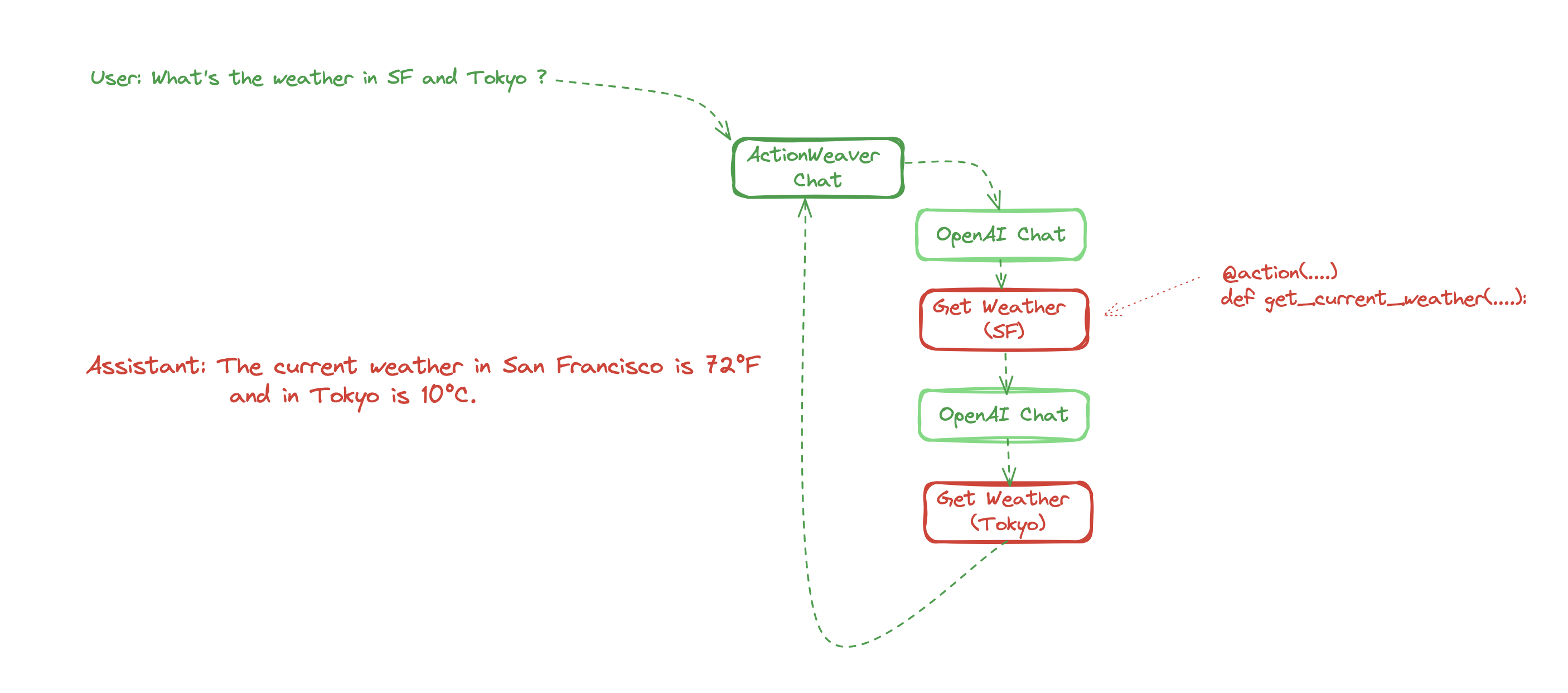
Inspired by langsmith,a JSON event is emitted when a LLM action is invoked. In the plot above, you can expect to see five events emitted. Each event contains essential details such as name, ID, inputs, outputs, and a parent_run_id for tracing lineage. Additionally, users have the flexibility to incorporate custom fields into these events as needed.
Step 1: Use ActionWeaver patch the AzureOpenAI client
[23]:
import os
from openai import AzureOpenAI
from actionweaver.llms import patch
from actionweaver.llms.azure.tokens import TokenUsageTracker


client = patch(AzureOpenAI(
    azure_endpoint = os.getenv("AZURE_OPENAI_ENDPOINT"),
    api_key=os.getenv("AZURE_OPENAI_KEY"),
    api_version="2023-10-01-preview"
))
Step 2: In this section, we set up a logger to record messages in a well-structured JSON format and save them in a file named ‘tracing.log’.
[24]:
import logging
from pythonjsonlogger import jsonlogger

# Initialize logging
logger = logging.getLogger(__name__)
logger.setLevel(logging.DEBUG)


# Create a FileHandler for logging to the file 'tracing.log'
file_handler = logging.FileHandler('tracing.log')
logger.addHandler(file_handler)

# Define JSON format
log_format = jsonlogger.JsonFormatter(
    '%(asctime)s.%(msecs)04d %(levelname)s %(module)s %(funcName)s %(message)s %(lineno)d',
    datefmt='%Y-%m-%d %H:%M:%S'
)

# Set the JSON formatter for handlers
file_handler.setFormatter(log_format)
Step 3: Just like in the Quickstart, we’ve defined two actions, with the only distinction being that we pass the logger as an argument into the action decorators.
[25]:
from actionweaver import action

@action(name="GetCurrentTime", logger=logger)
def get_current_time() -> str:
    """
    Use this for getting the current time in the specified time zone.

    :return: A string representing the current time in the specified time zone.
    """
    print ("Getting current time...")
    import datetime
    current_time = datetime.datetime.now()

    return f"The current time is {current_time}"


@action(name="GetWeather", stop=False, logger=logger)
def get_current_weather(location, unit="fahrenheit"):
    """Get the current weather in a given location"""
    print ("Getting current weather")

    import json
    if "tokyo" in location.lower():
        return json.dumps({"location": "Tokyo", "temperature": "10", "unit": "celsius"})
    elif "san francisco" in location.lower():
        return json.dumps({"location": "San Francisco", "temperature": "72", "unit": "fahrenheit"})
    elif "paris" in location.lower():
        return json.dumps({"location": "Paris", "temperature": "22", "unit": "celsius"})
    else:
        return json.dumps({"location": location, "temperature": "unknown"})
Step 4 Invoke the chat completion API while including the logger as an argument. Additionally: - The logging_name for the event is generated when the API is invoked. - This invocation will initiate a sequence of API calls and events emitted, which include: - The event is named {logging_name}.chat.completions.create, and it corresponds to making an original OpenAI chat API call. - Actions such as GetWeather and GetCurrentTime will be triggered during this process.
[26]:
messages = [
    {"role": "system", "content": "You are a helpful assistant."},
    {"role": "user", "content": "what time is it and what's the weather in San Francisco and Tokyo ?"}
  ]

from actionweaver.utils.tokens import TokenUsageTracker
response = client.chat.completions.create(
  model="gpt-35-turbo-0613-16k",
  messages=messages,
  actions = [get_current_time, get_current_weather],
  stream=False,
  logger=logger,
  logging_name="conversation_start",
  token_usage_tracker = TokenUsageTracker(5000),
)
Getting current time...
Getting current weather
Getting current weather
Step 5
Use your favorite visualization or log analytics tool to analyze the log.
[29]:
# Let's take a look at the structured log
with open(log_file_path, 'r') as file:
    logs = [json.loads(line.strip()) for line in file]
    logs.sort(key=lambda x: x['timestamp'])
logs[:2]
[29]:
[{'asctime': '2023-12-30 11:33:20',
  'msecs': 817.0,
  'levelname': 'INFO',
  'module': 'helpers',
  'funcName': 'wrapper',
  'message': '',
  'lineno': 67,
  'name': 'conversation_start.chat.completions.create',
  'inputs': {'messages': [{'role': 'system',
     'content': 'You are a helpful assistant.'},
    {'role': 'user',
     'content': "what time is it and what's the weather in San Francisco and Tokyo ?"}],
   'model': 'gpt-35-turbo-0613-16k',
   'frequency_penalty': 'NOT_GIVEN',
   'function_call': 'auto',
   'functions': [{'name': 'GetCurrentTime',
     'description': '\n    Use this for getting the current time in the specified time zone.\n    \n    :return: A string representing the current time in the specified time zone.\n    ',
     'parameters': {'properties': {},
      'title': 'Get_Current_Time',
      'type': 'object'}},
    {'name': 'GetWeather',
     'description': 'Get the current weather in a given location',
     'parameters': {'properties': {'location': {'title': 'Location'},
       'unit': {'default': 'fahrenheit', 'title': 'Unit'}},
      'required': ['location'],
      'title': 'Get_Current_Weather',
      'type': 'object'}}],
   'logit_bias': 'NOT_GIVEN',
   'logprobs': 'NOT_GIVEN',
   'max_tokens': 'NOT_GIVEN',
   'n': 'NOT_GIVEN',
   'presence_penalty': 'NOT_GIVEN',
   'response_format': 'NOT_GIVEN',
   'seed': 'NOT_GIVEN',
   'stop': 'NOT_GIVEN',
   'stream': False,
   'temperature': 'NOT_GIVEN',
   'tool_choice': 'NOT_GIVEN',
   'tools': 'NOT_GIVEN',
   'top_logprobs': 'NOT_GIVEN',
   'top_p': 'NOT_GIVEN',
   'user': 'NOT_GIVEN',
   'extra_headers': None,
   'extra_query': None,
   'extra_body': None,
   'timeout': 'NOT_GIVEN'},
  'outputs': "ChatCompletion(id='chatcmpl-8bWYye2pzj3U945fevaZ4X85QI2qM', choices=[Choice(finish_reason='function_call', index=0, logprobs=None, message=ChatCompletionMessage(content=None, role='assistant', function_call=FunctionCall(arguments='{}', name='GetCurrentTime'), tool_calls=None), content_filter_results={})], created=1703954000, model='gpt-35-turbo-16k', object='chat.completion', system_fingerprint=None, usage=CompletionUsage(completion_tokens=7, prompt_tokens=117, total_tokens=124), prompt_filter_results=[{'prompt_index': 0, 'content_filter_results': {'hate': {'filtered': False, 'severity': 'safe'}, 'self_harm': {'filtered': False, 'severity': 'safe'}, 'sexual': {'filtered': False, 'severity': 'safe'}, 'violence': {'filtered': False, 'severity': 'safe'}}}])",
  'parent_run_id': 'b46e808f-a898-437f-a45e-12a24dde579b',
  'run_id': 'b4392758-d737-4292-afb8-776ae5876bc6',
  'timestamp': 1703954000.81724},
 {'asctime': '2023-12-30 11:33:20',
  'msecs': 820.0,
  'levelname': 'INFO',
  'module': 'helpers',
  'funcName': 'wrapper',
  'message': '',
  'lineno': 67,
  'name': 'GetCurrentTime',
  'inputs': {},
  'outputs': 'The current time is 2023-12-30 11:33:20.820080',
  'parent_run_id': 'b46e808f-a898-437f-a45e-12a24dde579b',
  'run_id': '83473841-7d38-4348-8967-6dd1916220bd',
  'timestamp': 1703954000.820106}]
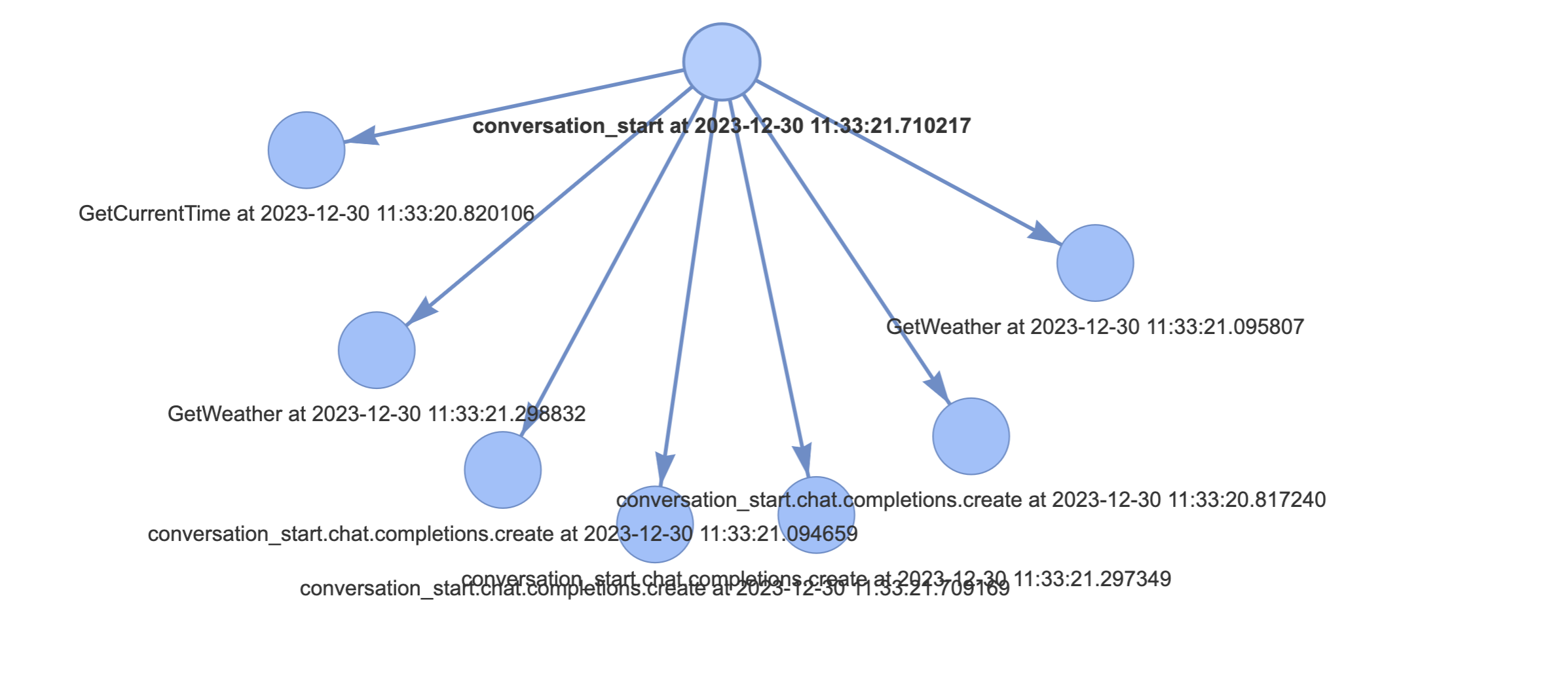
Here I’m going to use pyvis (0.3.1).and visualize it in network.html like this
[30]:
import json
from pyvis.network import Network
import datetime


# Replace this with the actual path to your log file
log_file_path = 'tracing.log'

# Initialize a network graph
net = Network(height="750px", width="100%", directed=True)

for log_entry in logs:
    run_id = log_entry.get("run_id")
    # Add the current log entry as a node
    net.add_node(run_id, label=log_entry['name'] + " at " + str(datetime.datetime.fromtimestamp(log_entry['timestamp'])))


for log_entry in logs:
    run_id = log_entry.get("run_id")
    parent_run_id = log_entry.get("parent_run_id")
    if parent_run_id:
        net.add_edge(parent_run_id, run_id)

# Set some options for better visualization (optional)
net.set_options("""
var options = {
  "nodes": {
    "shape": "dot",
    "scaling": {
      "min": 10,
      "max": 30
    }
  },
  "edges": {
    "color": {
      "inherit": true
    },
    "smooth": false
  },
  "physics": {
    "forceAtlas2Based": {
      "gravitationalConstant": -100,
      "centralGravity": 0.01,
      "springLength": 200,
      "springConstant": 0.08
    },
    "maxVelocity": 50,
    "minVelocity": 0.1,
    "solver": "forceAtlas2Based"
  }
}
""")

# Save and show the network
net.show('network.html')
[ ]: