Extracting Knowledge Graph from Unstructured Text
Inspired by example https://jxnl.github.io/instructor/examples/knowledge_graph/, this example will show how to use ActionWeaver to create a knowledge graph from unstructured text by making use of OpenAI function calls.
Step 1 Let’s set up an Azure OpenAI Client and then use ActionWeaver patch to enhance its API
[1]:
from openai import OpenAI
import os
from openai import AzureOpenAI
import actionweaver.llms as llms


# Azure OpenAI
model="gpt-35-turbo-0613-16k"
client = llms.wrap(AzureOpenAI(
    azure_endpoint = os.getenv("AZURE_OPENAI_ENDPOINT"),
    api_key=os.getenv("AZURE_OPENAI_KEY"),
    api_version="2023-10-01-preview"
))

# If you want to use OpenAI endpoint
# from openai import OpenAI
# client = llms.patch(OpenAI())
Step 2 We will use Pydantic Model to define structures (knowledge graph) we want to extract from the raw text.
[2]:
from pydantic import BaseModel, Field
from typing import List

class Node(BaseModel):
    id: int
    label: str
    color: str

class Edge(BaseModel):
    source: int
    target: int
    label: str
    color: str = "black"

class KnowledgeGraph(BaseModel):
    nodes: List[Node] = Field(..., default_factory=list)
    edges: List[Edge] = Field(..., default_factory=list)
Step 3: Utilize the action_from_model function to convert the PyDantic model into an ActionWeaver action. Then, employ the invoke method to evaluate an example. By using force=True, you compel the LLM to execute the action.
[17]:
from actionweaver.actions.factories.pydantic_model_to_action import action_from_model

query = "Everything about jiu jitsu"

messages=[
        {
            "role": "user",
            "content": f"Help me understand the following by describing it as a detailed knowledge graph: {query}",
        }
    ]
kg = action_from_model(KnowledgeGraph, stop=True).invoke(client, model=model, messages=messages, force=True)
[18]:
kg
[18]:
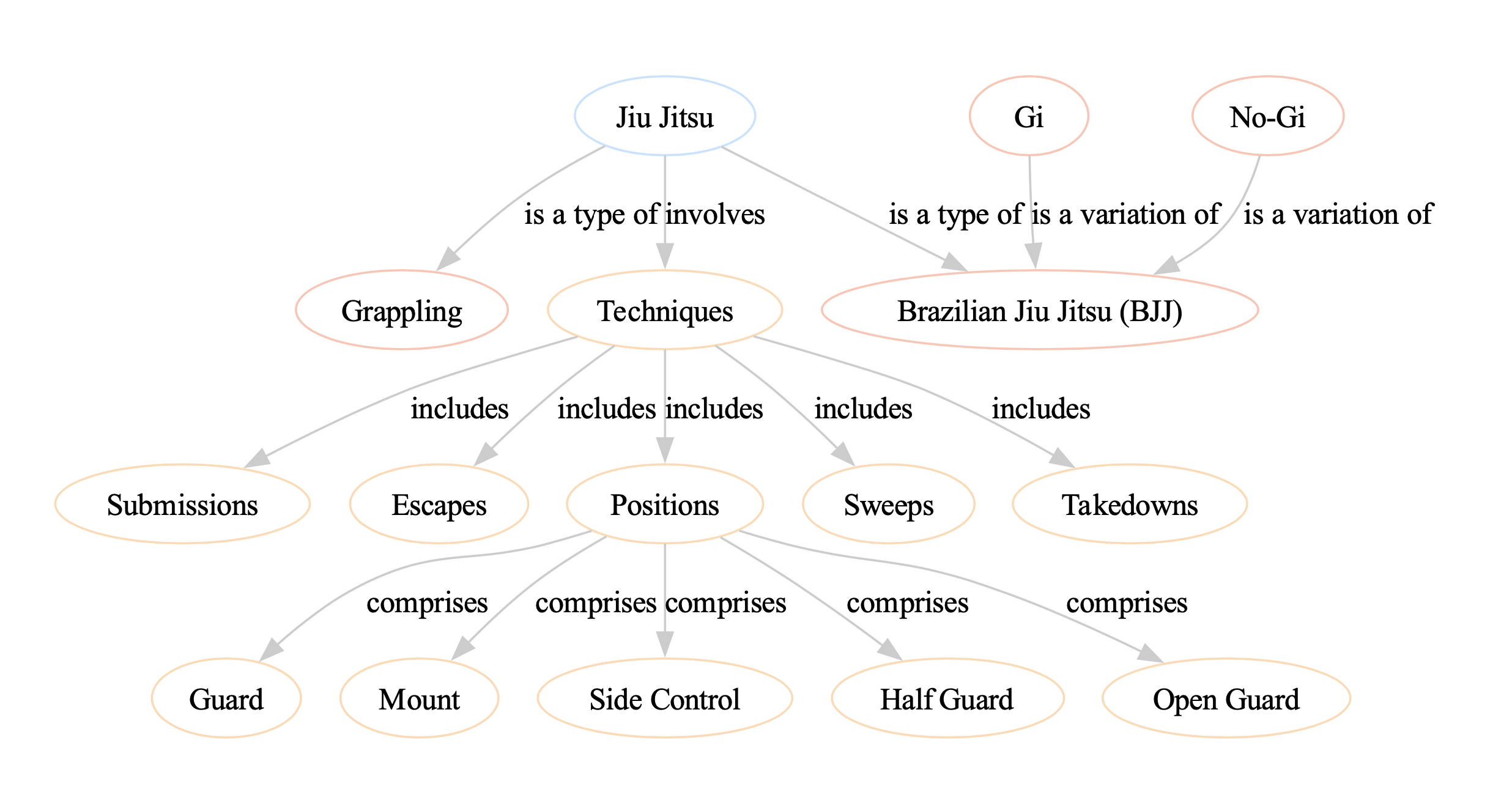
KnowledgeGraph(nodes=[Node(id=1, label='Jiu Jitsu', color='blue'), Node(id=2, label='Origin', color='yellow'), Node(id=3, label='Techniques', color='yellow'), Node(id=4, label='Gi', color='yellow'), Node(id=5, label='No-Gi', color='yellow'), Node(id=6, label='Brazilian Jiu Jitsu', color='green'), Node(id=7, label='Japanese Jiu Jitsu', color='green'), Node(id=8, label='Positions', color='yellow'), Node(id=9, label='Mount', color='yellow'), Node(id=10, label='Guard', color='yellow'), Node(id=11, label='Side Control', color='yellow'), Node(id=12, label='Back Control', color='yellow'), Node(id=13, label='Submissions', color='yellow'), Node(id=14, label='Chokes', color='yellow'), Node(id=15, label='Joint Locks', color='yellow')], edges=[Edge(source=1, target=2, label='Origin', color='black'), Edge(source=1, target=3, label='Includes', color='black'), Edge(source=3, target=4, label='Includes', color='black'), Edge(source=3, target=5, label='Includes', color='black'), Edge(source=1, target=6, label='Type', color='black'), Edge(source=1, target=7, label='Type', color='black'), Edge(source=1, target=8, label='Includes', color='black'), Edge(source=8, target=9, label='Includes', color='black'), Edge(source=8, target=10, label='Includes', color='black'), Edge(source=8, target=11, label='Includes', color='black'), Edge(source=8, target=12, label='Includes', color='black'), Edge(source=1, target=13, label='Includes', color='black'), Edge(source=13, target=14, label='Includes', color='black'), Edge(source=13, target=15, label='Includes', color='black')])
[19]:
# Copied from https://jxnl.github.io/instructor/examples/knowledge_graph/

from graphviz import Digraph

def visualize_knowledge_graph(kg: KnowledgeGraph):
    dot = Digraph(comment="Knowledge Graph")

    # Add nodes
    for node in kg.nodes:
        dot.node(str(node.id), node.label, color=node.color)

    # Add edges
    for edge in kg.edges:
        dot.edge(str(edge.source), str(edge.target), label=edge.label, color=edge.color)

    # Render the graph
    dot.render("knowledge_graph.gv", view=True)
[20]:
visualize_knowledge_graph(kg)